
CSS animation 动画
概述
【区分】transition & animation 动画
-
transition:过渡是通过初始和结束两个状态之间的平滑过渡实现简单动画的;
-
animation:则是通过关键帧
@keyframes来实现更为复杂的动画效果。
关键帧定义动画
关键帧的语法是以 @keyframes 开头,后面紧跟着动画名称 animation-name。
语法
from 等同于 0%,to 等同于 100%。百分比跟随的花括号里面的代码,代表此时对应的样式;
@keyframes animation-name {
  0% {
  }
  /* ... */
  100% {
  }
}

/* 示例 */
@keyframes animation-name {
  from {
  }
  to {
  }
}
示例
<div></div>


<style>
  /* 1、关键帧定义动画; */
  @keyframes test {
    0% {
      background-color: lightblue;
    }
    100% {
      background-color: black;
    }
  }
  /* 2、调用动画 */
  div {
    width: 300px;
    height: 100px;
    background-color: pink;
    animation-name: test;
    animation-duration: 3s;
    animation-iteration-count: infinite;
  }
</style>

注意
1、百分比顺序不一定非要从 0%到 100%排列,最终浏览器会自动按照 0%-100%的顺序进行解析;
2、如果存在负百分数或高于 100%的百分数,则该关键帧将被忽略
示例:
/* -20%和120%对应的代码无效*/
@keyframes test {
  -20% {
    background-color: red;
  }
  /* 上面的 负关键帧 在动画执行时胡被忽略 */
  0% {
    background-color: lightblue;
  }
  30% {
    background-color: lightgreen;
  }
  60% {
    background-color: lightgray;
  }
  100% {
    background-color: black;
  }
  120% {
    background-color: yellow;
  }
}
3、如果 0%或 100%不指定关键帧,将使用该元素默认的属性值;
/* 0%和100%对应的颜色是默认值pink*/
@keyframes test {
  30% {
    background-color: lightgreen;
  }
  60% {
    background-color: lightgray;
  }
}
4、若存在多个 同名的 @keyframes,浏览器只识别最后一个@keyframes 里面的值;
5、空的 keyframes 规则是有效的,它们会覆盖前面有效的关键帧规则
调用动画
tip: 和 transition 属性类似。
animation-name / 动画名称
语法:
animation-name: name;
属性值
- none
- 自定义动画名称
初始值: none
应用于:所有元素;
继承性:无
注意
1、如果多个动画试图修改相同的属性,name 设置的动画名称后面覆盖前面;(和动画定义的顺序无关)
示例:
/* 动画 test2 会覆盖 test1,这里和动画定义的顺序无关 */
div {
  width: 300px;
  height: 100px;
  background-color: pink;
  animation-name: test1, test2;
  animation-duration: 3s;
  animation-iteration-count: infinite;
}
@keyframes test2 {
  0% {
    background-color: blue;
  }
  30% {
    background-color: green;
  }
  60% {
    background-color: gray;
  }
  100% {
    background-color: black;
  }
}
@keyframes test1 {
  0% {
    background-color: lightblue;
  }
  30% {
    background-color: lightgreen;
  }
  60% {
    background-color: lightgray;
  }
  100% {
    background-color: black;
  }
}
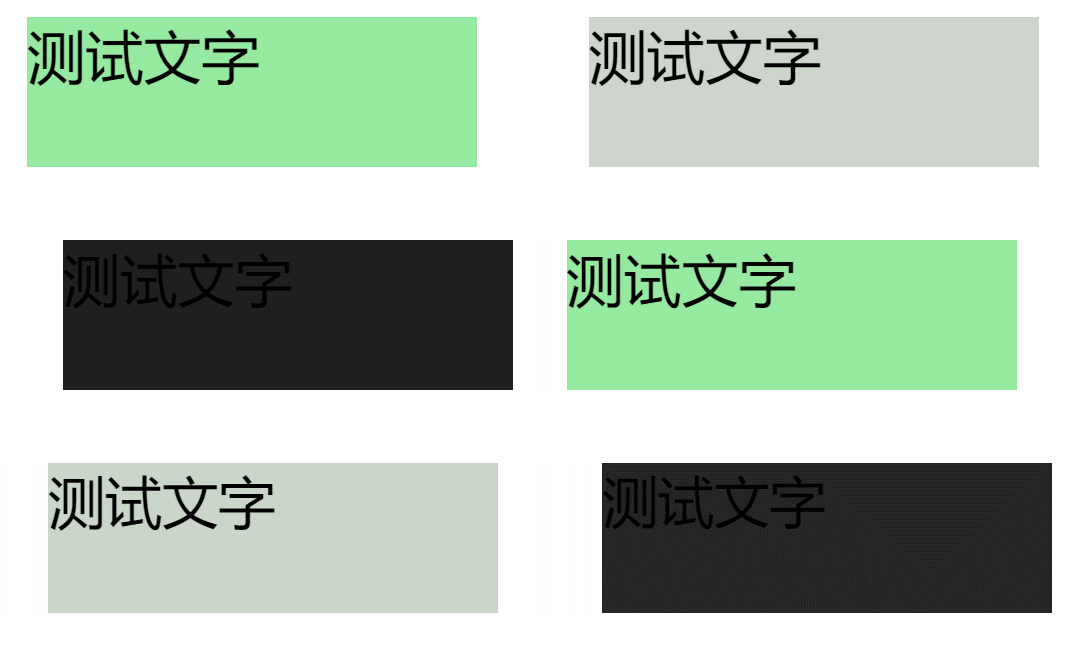
2、如果动画的其他 7 个子属性和动画名称的长度不同,动画名称列表的长度决定最终的长度,多余的值无余,缺少的值按照顺序进行重复;(不大懂)
div{
    width: 300px;
    height: 100px;
    position: relative;
    background-color: pink;
    animation-name: test1,test2,test3;
    animation-duration: 3s,1s;
    animation-iteration-count: infinite;
}
@keyframes test1{
    0%{background-color: lightblue;}
    30%{background-color: lightgreen;}
    60%{background-color: lightgray;}
    100%{background-color: black;}
}
@keyframes test2{
    0%{font-size: 20px;}
    30%{font-size: 30px;}
    60%{font-size: 40px;}
    100%{font-size: 50px;}
}
@keyframes test3{
    0%{left: 0px;}
    30%{left: 30px;}
    60%{left: 40px;}
    100%{left: 50px;}
}

/* <div>测试文字</div> */
animation-duration / 持续时间
值: 数字,单位 m/ms
初始值: 0s;
应用于:所有元素;
继承性:无;
注意: 0s 意味着没有时间,持续时间不能为负值;
animation-name: test1, test2;
/*test1的持续时间设置为负值,将使得整个动画持续时间都失效,因此test2也将没有动画效果 */
animation-duration: -1s, 1s;
animation-timing-function / 时间函数
值:时间函数
初始值: ease
应用于:所有元素;
继承性: 无;
animation 的时间函数类似于 transition 的时间函数。时间函数可以应用于整个动画中,也可以应用于关键帧的某 2 个百分比之间;
示例:
div {
  width: 300px;
  height: 100px;
  position: relative;
  background-color: pink;
  animation-name: test;
  animation-duration: 5s;
  animation-iteration-count: infinite;
}

@keyframes test {
  0% {
    left: 0px;
    animation-timing-function: ease;
  }
  20% {
    left: 50px;
    animation-timing-function: linear;
  }
  40% {
    left: 100px;
    animation-timing-function: ease-in;
  }
  60% {
    left: 150px;
    animation-timing-function: ease-out;
  }
  80% {
    left: 200px;
    animation-timing-function: step-start;
  }
  100% {
    left: 250px;
    animation-timing-function: step-end;
  }
}
animation-iteration-count / 循环次数
值: infinite | 数字
初始值:1
应用于:所有元素
继承性: 无
注意:
- 默认为 1, 可以是整数也可以是小数,但不能是 0 或负数;
- 常用为 infinite 表示无限次动画;
animation-direction / 动画方向
值:
- normal:正向播放;
- reverse:反向播放;
- alternate:一正一反;
- altername-reverse:一反一正;
注意: safari 浏览器不支持 reverse 属性和 alternate-reverse 属性;
animation-play-state / 动画状态
值:
- running:表示播放中(初始值);
- paused:动画暂停;
继承性:无
animation-delay / 动画延迟时间
作用:定义多少时间后开始播放动画;
值:
- 正值:延迟 n 秒后开始;
- 0:(默认值)立即开始;
- 负值:加快 n 绝对值秒后开始;
注意:
- 该延迟时间是指整个动画的延迟时间,而不是每个循环的延迟时间,只在动画开始时进行一次时间延迟;
- 如果该值是负值,则表示动画的起始时间从 0s 变为延迟时间的绝对值;
animation-fill-mode / 开始 & 结束帧位置
作用:定义动画开始帧之前和结束帧之后的动作;
值:
- none:动画结束后,元素移动到初始状态;
- 注意:初始状态并不是指 0%的元素状态,而是元素本身属性值;
- forwards:元素停在动画结束的位置;
- 注意:动画结束时的位置并不一定是 100%定义的位置,因为动画有可能反向运动,也有可能动画的次数是小数;
- backwards:在 animation-delay 的时间内,元素立刻移动到动画开始时的位置。若元素无 animation-delay 时,与 none 的效果相同;
- 注意:动画开始时的位置也不一定是 0%定义的位置,因为动画有可能反向运动;
- both:同时具有 forwards 和 backwards 的效果;
注意:当持续时间 animation-duration 为 0s 时,animation-fill-mode 依然适用, 当 animation-fill-mode 的值为 backwards 时,动画填充在任何 animation-delay 的阶段。 当 animation-fill-mode 的值为 forwards 时,动画将保留在 100%的关键帧上
调用-简写 / 多值
语法
animation: name duration timing-function delay count direction;
调用动画: 名称 时长 时间曲线函数 延迟 次数 顺序
//最简单
animation: name 2s;
常用示例
div {
  width: 300px;
  height: 100px;
  background-color: pink;
  animation: 1s test1, infinite test2 2s 1s;
}
@keyframes test1 {
  30% {
    background-color: red;
  }
  60% {
    background-color: blue;
  }
  100% {
    background-color: green;
  }
}
@keyframes test2 {
  100% {
    color: white;
  }
}
api
animation 涉及到的事件有 animationstart、animationend、animationiteration 三个。这三个事件的 bubbles 都是 yes,cancelable 都是 no
animationstart
作用:动画开始时触发的事件;
注意:
- 如果存在 delay,且 delay 为正值,则元素等待延迟完毕后,再触发该事件;
- 如果 delay 为负值,则元素先将初始值变为 delay 的绝对值时,再触发该事件;
示例:
oSb.addEventListener(
  "animationstart",
  function () {
    this.innerHTML = "动画开始";
    this.style.background = "lightgreen";
  },
  false
);
animationend
作用:动画结束时触发的事件;
示例:
test.addEventListener(
  "animationend",
  function () {
    this.style.background = "lightgreen";
    this.innerHTML = "动画结束";
  },
  false
);
animationteration
作用:发生在动画的一次循环结束时,只有当 iteration-count 循环次数大于 1 时,触发该事件;
var i = 0;
oSb.addEventListener(
  "animationiteration",
  function () {
    i++;
    this.innerHTML = i;
  },
  false
);
补充
只有改变 animation-name 时,才会使 animation 动画效果重新触发。
oSb.style.animationName = "none";
setTimeout(function () {
  oSb.style.animationName = "test";
}, 100);
属性
这三个事件的事件对象,都有 animationName 和 elapsedTime 属性这两个私有属性;
animationName属性:返回产生过渡效果的CSS属性名
elapsedTime属性:动画已经运行的秒数
注意:对于 animationstart 事件,elapsedTime 属性等于 0,除非 animation-delay 属性等于负值;
示例:
<style>
#test {
  height: 100px;
  width: 300px;
  background-color: lightblue;
  animation: anim 2s 3;
}
@keyframes anim {
  0% {
    height: 100px;
  }
  50% {
    height: 50px;
  }
  100% {
    height: 0;
  }
}
</style>

<button id="reset">还原</button>
<div id="test"></div>
<script>
reset.onclick = function () {
  history.go();
};
test.addEventListener("animationstart", listener, false);
test.addEventListener("animationend", listener, false);
test.addEventListener("animationiteration", listener, false);
function listener(e) {
  e = e || event;
  var li = document.createElement("li");
  switch (e.type) {
    case "animationstart":
      li.innerHTML = "Started: elapsed time is " + e.elapsedTime;
      break;
    case "animationend":
      li.innerHTML = "Ended: elapsed time is " + e.elapsedTime;
      break;
    case "animationiteration":
      li.innerHTML = "New loop started at time " + e.elapsedTime;
      break;
  }
  test.appendChild(li);
}
</script>
动画兼容性
【兼容性】:如果低版本浏览器,想要使用动画,需要在动动画声明的时候添加前缀:@-webkit-keyframs 动画名称{}
animation.css
animation.css:是一个第三方 css 动画库;
【使用步骤】:
-
下载 animation.css;
-
在 html 中导入;
-
示例网站查看效果;
-
类名调用动画;

分享最新的 NVIDIA AI Software 资源以及活动/会议信息,精选收录AI相关技术内容,欢迎大家加入社区并参与讨论。
更多推荐

 29
29 0
0- 0


 已为社区贡献1条内容

所有评论(0)