
多模态编辑新纪元:Qwen-Image-Edit-2509技术深度解析与实战指南
Qwen-Image-Edit-2509是阿里通义千问团队推出的革命性多模态AI图像编辑模型,其核心创新在于多图像融合机制和一致性增强技术。模型采用统一的Transformer架构处理文本和图像输入,通过视觉编码器将图像转换为视觉token,与文本token在同一语义空间交互。关键技术包括动态图像拼接算法(解析空间关系、自适应布局、颜色校正)和身份保持网络(提取并注入身份特征)。实战应用支持多图像
多模态编辑新纪元:Qwen-Image-Edit-2509技术深度解析与实战指南
阿里通义千问团队推出的Qwen-Image-Edit-2509正在重新定义AI图像编辑的边界,这一革命性多模态模型将文本理解与视觉生成完美融合,开启了智能图像编辑的全新时代。本文将深入剖析其核心架构、创新特性及实际应用,为开发者和研究者提供全面的技术指南。
一、模型架构与技术原理
1.1 多图像融合机制:视觉合成的量子跃迁
Qwen-Image-Edit-2509最核心的创新在于其多图像编辑能力,这突破了传统单图像编辑模型的局限。模型采用先进的图像拼接技术和注意力机制,实现了多源图像的语义级融合。
其数学基础建立在跨模态注意力机制上:
MultiImageAttention = Softmax ( Q text K images T d k ) V images \text{MultiImageAttention} = \text{Softmax}\left(\frac{Q_{\text{text}}K_{\text{images}}^T}{\sqrt{d_k}}\right)V_{\text{images}} MultiImageAttention=Softmax(dkQtextKimagesT)Vimages
其中文本Query与多图像Key进行交互,通过注意力权重动态融合不同图像的视觉特征。
import torch
import torch.nn as nn
from PIL import Image
from modelscope import QwenImageEditPlusPipeline

# 初始化多图像编辑管道
def initialize_multi_image_pipeline():
    # 加载预训练的多图像编辑模型,使用bfloat16精度平衡速度与内存
    pipeline = QwenImageEditPlusPipeline.from_pretrained(
        "Qwen/Qwen-Image-Edit-2509",
        torch_dtype=torch.bfloat16
    )

    # 将模型移动到GPU设备加速推理
    pipeline.to('cuda')

    # 配置进度条显示,便于监控生成过程
    pipeline.set_progress_bar_config(disable=None)

    return pipeline

# 创建多图像编辑管道实例
edit_pipeline = initialize_multi_image_pipeline()
print("多图像编辑管道加载完成,准备处理输入")
这段初始化代码展示了如何正确加载Qwen-Image-Edit-2509模型。选择bfloat16精度能够在保持模型性能的同时显著减少显存占用,这对于处理多图像输入尤为重要。管道初始化后,设置了进度条监控,让用户能够实时了解图像生成进度。
1.2 多模态理解架构
模型采用统一的Transformer架构处理文本和图像输入,通过视觉编码器将图像转换为视觉token,与文本token在同一个语义空间中进行交互:
class MultimodalTransformer(nn.Module):
    def __init__(self, config):
        super().__init__()
        self.visual_encoder = VisualEncoder(config.vision_config)
        self.text_encoder = TextEncoder(config.text_config)
        self.fusion_encoder = FusionTransformer(config.fusion_config)

    def forward(self, images, text):
        # 提取视觉特征
        visual_features = self.visual_encoder(images)

        # 提取文本特征
        text_features = self.text_encoder(text)

        # 多模态特征融合
        fused_features = self.fusion_encoder(
            visual_features, text_features
        )

        return fused_features
视觉编码器负责将输入图像转换为特征序列,文本编码器处理文本指令,而融合编码器则通过交叉注意力机制实现文本与图像的深度交互,这是模型理解复杂编辑指令的关键。
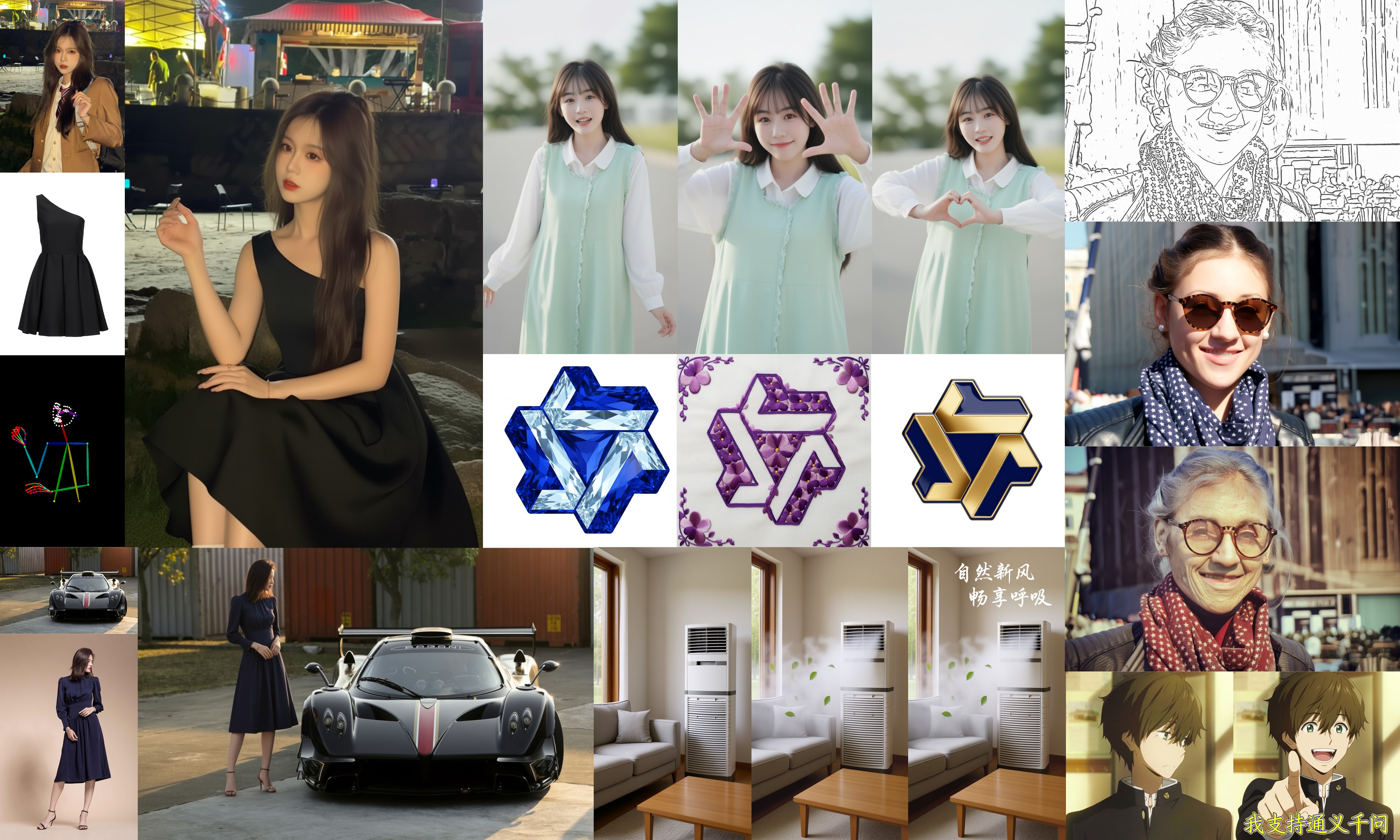
二、多图像编辑核心技术
2.1 动态图像拼接算法
多图像编辑的核心挑战在于如何将不同来源的图像在语义层面进行有机结合。Qwen-Image-Edit-2509采用自适应的图像拼接策略:
def dynamic_image_composition(image_list, prompt):
    """
    根据文本指令动态组合多图像输入
    """
    # 分析文本指令中的空间关系关键词
    spatial_relations = extract_spatial_relations(prompt)

    # 根据关系确定图像布局
    layout = determine_layout(len(image_list), spatial_relations)

    # 生成拼接掩码,确保平滑过渡
    blend_masks = generate_blend_masks(layout)

    # 应用自适应颜色校正
    corrected_images = color_correction(image_list)

    return compose_images(corrected_images, layout, blend_masks)
该算法首先解析文本提示中的空间关系描述(如"在左边"、“在右边”、"面对彼此"等),然后根据这些关系确定各输入图像在最终合成图像中的位置。颜色校正步骤确保不同来源的图像在色调和亮度上保持一致,而混合掩码则让图像边界过渡更加自然。
2.2 多图像编辑实战示例
def multi_image_editing_demo():
    """多图像编辑完整示例"""

    # 加载输入图像
    image1 = Image.open("magician_bear.png")
    image2 = Image.open("alchemist_bear.png")

    # 构建编辑指令,明确描述期望的场景
    editing_prompt = "魔法师熊在左边,炼金术士熊在右边,在中央公园广场面对面站立"

    # 准备模型输入参数
    inputs = {
        "image": [image1, image2],  # 多图像输入列表
        "prompt": editing_prompt,   # 详细的编辑指令
        "generator": torch.manual_seed(42),  # 设置随机种子保证可重现性
        "true_cfg_scale": 4.0,      # 分类器自由引导尺度
        "negative_prompt": " ",     # 负面提示,此处为空
        "num_inference_steps": 40,  # 扩散模型推理步数
        "guidance_scale": 1.0,      # 引导尺度
        "num_images_per_prompt": 1, # 每个提示生成的图像数量
    }

    # 执行推理过程
    with torch.inference_mode():
        output = edit_pipeline(**inputs)
        result_image = output.images[0]

        # 保存生成结果
        result_image.save("multi_image_edit_result.png")
        print(f"多图像编辑完成,结果保存至: {os.path.abspath('multi_image_edit_result.png')}")

# 执行多图像编辑演示
multi_image_editing_demo()
这个完整示例展示了如何使用Qwen-Image-Edit-2509处理多图像输入。关键参数中,true_cfg_scale控制文本引导的强度,较高的值使模型更严格遵循文本指令;num_inference_steps影响生成质量,步数越多通常细节越丰富但推理时间更长。
三、一致性增强技术解析
3.1 身份保持网络
在人像编辑中保持身份一致性是Qwen-Image-Edit-2509的重要突破。模型通过身份编码器和特征注入机制实现这一目标:
class IdentityPreservationNetwork(nn.Module):
    def __init__(self, embedding_dim=512):
        super().__init__()
        self.identity_encoder = IdentityEncoder(embedding_dim)
        self.feature_injection = FeatureInjectionModule()

    def forward(self, source_image, edit_instruction):
        # 提取源图像的身份特征
        identity_embedding = self.identity_encoder(source_image)

        # 在生成过程中注入身份特征
        edited_features = self.feature_injection(
            identity_embedding, edit_instruction
        )

        return edited_features
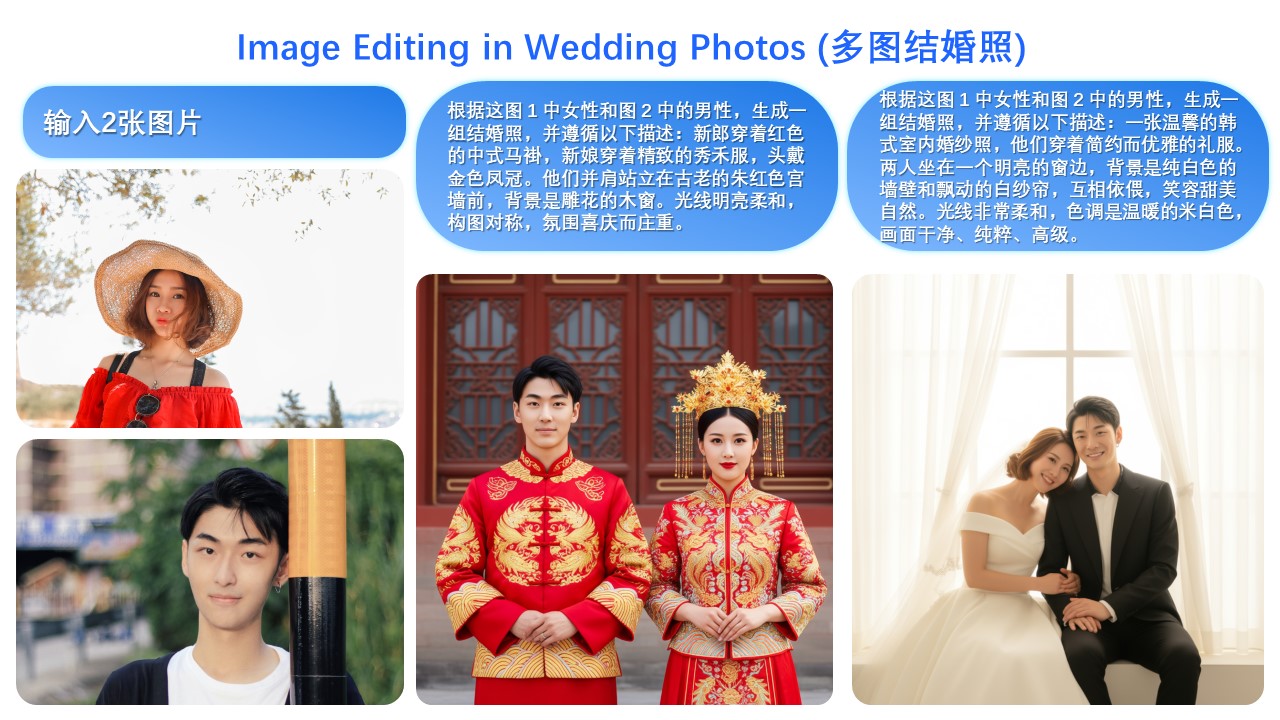
身份编码器专门学习人脸的关键特征点、肤色、发型等不变特征,而特征注入模块则确保这些身份特征在编辑过程中得到保持。即使在改变姿势、表情或风格时,人物的核心身份特征仍然能够被准确保留。
3.2 高级人像编辑实战
def advanced_portrait_editing():
    """高级人像编辑示例"""

    portrait = Image.open("input_portrait.jpg")

    # 不同风格的编辑指令示例
    style_prompts = [
        "将其转变为文艺复兴时期的油画风格",
        "制作成赛博朋克风格的数字肖像",
        "转换为水彩画效果,保持人物特征",
        "创建成复古海报风格,添加适当文字"
    ]

    results = []
    for i, prompt in enumerate(style_prompts):
        inputs = {
            "image": [portrait],
            "prompt": prompt,
            "generator": torch.manual_seed(i),
            "num_inference_steps": 50,  # 增加步数提升艺术质量
            "guidance_scale": 7.5,      # 提高引导强度确保风格转换
        }

        with torch.inference_mode():
            output = edit_pipeline(**inputs)
            results.append(output.images[0])

    # 保存所有风格结果
    for idx, result in enumerate(results):
        result.save(f"portrait_style_{idx}.png")

    print("人像风格转换完成,生成4种不同风格")
这段代码展示了如何利用Qwen-Image-Edit-2509进行多样化的人像风格编辑。通过调整guidance_scale参数,可以控制风格转换的强度,较高的值会产生更强烈的风格化效果,而适中的值则能在风格转换和身份保持之间取得更好平衡。
四、产品编辑与文字渲染技术
4.1 产品一致性保持算法
在商业应用中,产品图像的编辑需要严格保持产品标识的一致性。模型通过产品特征提取和约束生成实现这一目标:
class ProductConsistencyEngine:
    def __init__(self):
        self.product_detector = ProductFeatureDetector()
        self.constraint_generator = ConstraintAwareGenerator()

    def edit_product_image(self, product_image, background_prompt):
        # 检测产品的关键特征点
        product_features = self.product_detector(product_image)

        # 基于特征约束生成新背景
        constraints = self.generate_constraints(product_features)

        # 执行约束条件下的图像生成
        result = self.constraint_generator(
            product_image,
            background_prompt,
            constraints
        )

        return result

    def generate_constraints(self, features):
        """生成形状、颜色、纹理等保持约束"""
        constraints = {
            'shape_mask': features.shape_mask,
            'color_palette': features.dominant_colors,
            'texture_features': features.texture_descriptors,
            'logo_regions': features.logo_locations
        }
        return constraints
产品特征检测器识别产品的形状轮廓、主要颜色、材质纹理和标识位置等重要特征,约束生成器则确保在编辑过程中这些核心特征得到保持,从而实现在改变背景或场景的同时不改变产品本身。
4.2 产品海报生成示例
def generate_product_poster():
    """产品海报自动生成示例"""

    product_img = Image.open("product_photo.jpg")

    # 产品海报生成的多样化提示
    poster_prompts = [
        "将产品放置在豪华客厅场景中,自然光照,高端家居背景",
        "创建电商风格的产品展示图,纯色背景,突出产品细节",
        "生成节日促销海报,添加喜庆元素和折扣标签",
        "制作极简主义风格的产品宣传图,留白设计,突出产品形态"
    ]

    for i, prompt in enumerate(poster_prompts):
        inputs = {
            "image": [product_img],
            "prompt": prompt,
            "generator": torch.manual_seed(100 + i),
            "true_cfg_scale": 5.0,
            "num_inference_steps": 60,  # 更多步数确保背景细节质量
            "guidance_scale": 8.0,      # 高引导强度确保场景符合描述
        }

        with torch.inference_mode():
            output = edit_pipeline(**inputs)
            output.images[0].save(f"product_poster_{i}.png")

    print("产品海报生成完成,创建4种不同风格")
在实际应用中,产品图像编辑需要特别注意保持产品的关键视觉特征。通过调整推理步数和引导尺度,可以在生成质量和推理速度之间找到合适的平衡点。对于电商应用,通常需要批量生成多种风格的产品图,这个示例提供了可扩展的生成框架。
4.3 高级文字渲染引擎
Qwen-Image-Edit-2509在文字渲染方面具有显著优势,支持字体、颜色和材质的精确控制:
def advanced_text_rendering_demo():
    """高级文字渲染功能演示"""

    base_image = Image.open("template_with_text.jpg")

    # 文字编辑的各种场景
    text_editing_tasks = [
        {
            "prompt": "将标题文字改为手写字体,金色,有阴影效果",
            "params": {"true_cfg_scale": 6.0, "num_inference_steps": 45}
        },
        {
            "prompt": "修改正文文字为现代无衬线字体,深蓝色,半透明效果",
            "params": {"true_cfg_scale": 5.5, "num_inference_steps": 40}
        },
        {
            "prompt": "将标志文字改为金属质感,铬色,有立体雕刻效果",
            "params": {"true_cfg_scale": 7.0, "num_inference_steps": 55}
        }
    ]

    for i, task in enumerate(text_editing_tasks):
        inputs = {
            "image": [base_image],
            "prompt": task["prompt"],
            "generator": torch.manual_seed(200 + i),
            "true_cfg_scale": task["params"]["true_cfg_scale"],
            "num_inference_steps": task["params"]["num_inference_steps"],
            "guidance_scale": 1.0,
        }

        with torch.inference_mode():
            output = edit_pipeline(**inputs)
            output.images[0].save(f"text_edit_result_{i}.png")

    print("高级文字渲染完成,生成3种不同文字效果")
文字渲染功能特别适用于海报设计、广告制作和品牌材料更新。模型能够理解复杂的文字属性描述,并准确地在图像中实现这些效果,这大大减少了传统设计中手动调整的时间成本。
五、ControlNet集成与控制生成
5.1 原生ControlNet支持
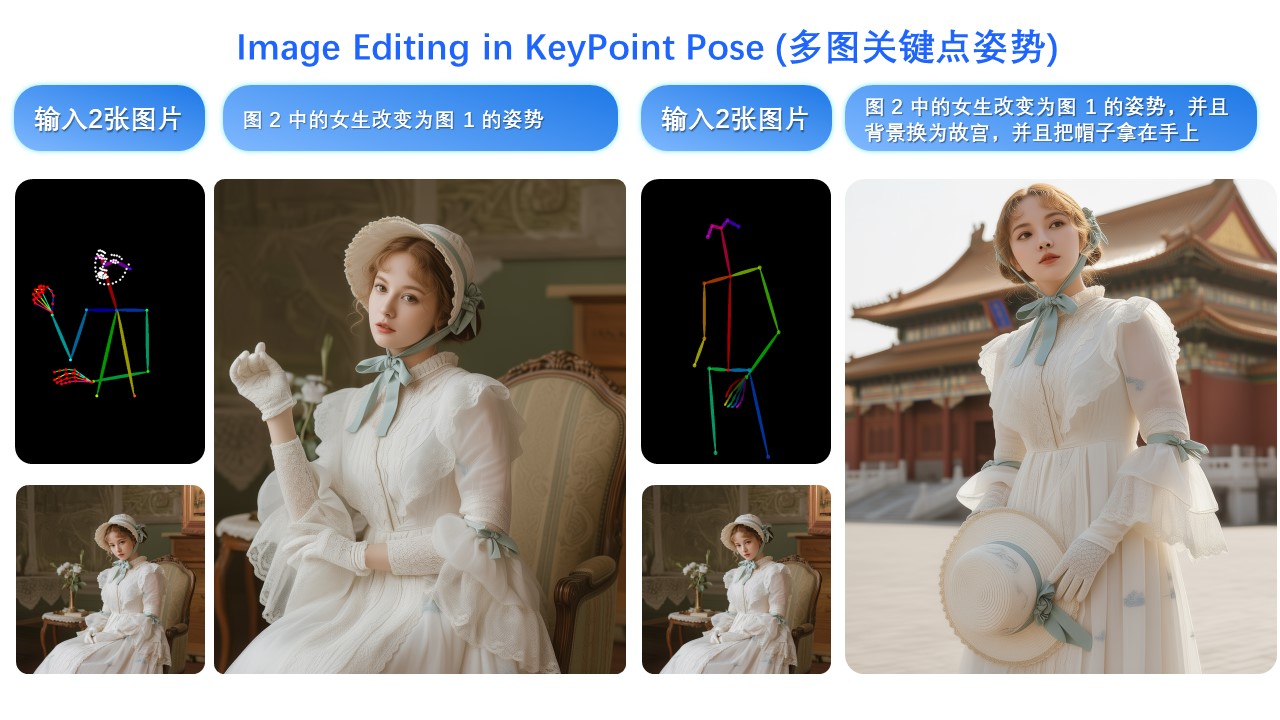
Qwen-Image-Edit-2509原生集成多种ControlNet条件控制,包括深度图、边缘检测、姿态关键点等:
class EnhancedControlNetIntegration:
    def __init__(self, pipeline):
        self.pipeline = pipeline
        self.condition_processors = {
            'depth': DepthProcessor(),
            'canny': CannyEdgeProcessor(),
            'pose': PoseKeypointProcessor(),
            'scribble': ScribbleProcessor()
        }

    def apply_controlnet_editing(self, image, control_image, control_type, prompt):
        """应用ControlNet条件控制进行图像编辑"""

        # 处理控制条件图像
        processor = self.condition_processors[control_type]
        control_condition = processor(control_image)

        # 准备ControlNet输入
        inputs = {
            "image": [image],
            "control_image": control_condition,
            "prompt": prompt,
            "controlnet_conditioning_scale": 0.8,  # 控制条件强度
            "generator": torch.manual_seed(300),
        }

        # 合并基础参数
        base_params = get_base_generation_params()
        inputs.update(base_params)

        return self.pipeline(**inputs)
ControlNet集成让用户能够通过额外的控制图像来精确指导生成过程。例如,使用深度图可以保持场景的几何结构,使用姿态关键点可以控制人物的动作,使用边缘检测图可以保持特定的轮廓形状。
5.2 姿态控制实战示例
def pose_controlled_editing():
    """基于姿态控制的图像编辑示例"""

    source_image = Image.open("person.jpg")
    pose_skeleton = Image.open("target_pose.jpg")

    # 初始化ControlNet处理器
    control_processor = EnhancedControlNetIntegration(edit_pipeline)

    # 使用姿态控制改变人物姿势
    result = control_processor.apply_controlnet_editing(
        image=source_image,
        control_image=pose_skeleton,
        control_type='pose',
        prompt="保持人物身份不变,但改变为目标姿势,背景自然过渡"
    )

    result.images[0].save("pose_controlled_result.png")
    print("姿态控制编辑完成,人物姿势已更新")

    # 边缘控制示例 - 用于草图到图像的生成
    user_sketch = Image.open("concept_sketch.png")
    sketch_result = control_processor.apply_controlnet_editing(
        image=user_sketch,  # 可以使用空白图像或简单底色
        control_image=user_sketch,
        control_type='scribble',
        prompt="将草图转换为逼真的室内设计场景,现代风格"
    )

    sketch_result.images[0].save("sketch_to_image.png")
    print("草图到图像转换完成")

# 执行ControlNet控制示例
pose_controlled_editing()
这个示例展示了如何利用ControlNet进行精确的图像控制。姿态控制特别适用于虚拟试衣、动画制作和游戏开发等领域,能够在保持人物身份的同时改变其动作姿态。草图控制则为设计师提供了快速概念可视化的工具,将简单的手绘转换为逼真的图像。
六、性能优化与部署策略
6.1 内存优化与加速技术
处理高分辨率图像和多图像输入时,内存管理和推理速度至关重要:
class MemoryOptimizedInference:
    def __init__(self, pipeline):
        self.pipeline = pipeline
        self.optimization_flags = {
            'enable_xformers': True,
            'enable_cpu_offload': False,
            'enable_sequential_cpu': True,
            'enable_model_cpu_offload': False
        }

    def apply_optimizations(self):
        """应用各种性能优化"""

        # 启用内存高效注意力
        if self.optimization_flags['enable_xformers']:
            self.pipeline.enable_xformers_memory_efficient_attention()

        # 启用序列CPU卸载,减少峰值内存使用
        if self.optimization_flags['enable_sequential_cpu']:
            self.pipeline.enable_sequential_cpu_offload()

        # 模型CPU卸载策略
        if self.optimization_flags['enable_model_cpu_offload']:
            self.pipeline.enable_model_cpu_offload()

        return self.pipeline

    def optimized_inference(self, inputs, resolution=(1024, 1024)):
        """优化后的推理流程"""

        # 预处理图像到合适分辨率
        processed_images = []
        for img in inputs["image"]:
            resized_img = self.resize_image(img, resolution)
            processed_images.append(resized_img)

        inputs["image"] = processed_images

        # 使用torch.inference_mode加速推理
        with torch.inference_mode():
            # 启用GPU加速
            with torch.cuda.amp.autocast(dtype=torch.bfloat16):
                result = self.pipeline(**inputs)

        return result

    def resize_image(self, image, target_size):
        """智能图像缩放,保持宽高比"""
        original_size = image.size
        ratio = min(target_size[0]/original_size[0], target_size[1]/original_size[1])
        new_size = (int(original_size[0]*ratio), int(original_size[1]*ratio))

        return image.resize(new_size, Image.LANCZOS)

# 使用优化推理
optimizer = MemoryOptimizedInference(edit_pipeline)
optimized_pipeline = optimizer.apply_optimizations()

print("性能优化已应用,准备高效推理")
内存优化策略包括使用xformers库的高效注意力机制、序列CPU卸载减少峰值内存占用,以及自动混合精度推理加速计算。这些优化对于在消费级GPU上运行大型多模态模型至关重要。
6.2 批量处理与生产部署
class BatchProcessingPipeline:
    def __init__(self, optimized_pipeline, batch_size=4):
        self.pipeline = optimized_pipeline
        self.batch_size = batch_size
        self.task_queue = []

    def add_editing_task(self, image_paths, prompt, output_path):
        """添加编辑任务到处理队列"""
        task = {
            'images': [Image.open(path) for path in image_paths],
            'prompt': prompt,
            'output_path': output_path
        }
        self.task_queue.append(task)

    def process_batch(self):
        """批量处理任务队列"""
        results = []

        for i in range(0, len(self.task_queue), self.batch_size):
            batch_tasks = self.task_queue[i:i+self.batch_size]
            batch_results = self.process_single_batch(batch_tasks)
            results.extend(batch_results)

        self.task_queue.clear()
        return results

    def process_single_batch(self, tasks):
        """处理单个批次的任务"""
        batch_results = []

        for task in tasks:
            inputs = {
                "image": task['images'],
                "prompt": task['prompt'],
                "generator": torch.manual_seed(hash(task['prompt']) % 10000),
                "num_inference_steps": 40,
                "guidance_scale": 1.0,
            }

            with torch.inference_mode():
                output = self.pipeline(**inputs)
                result_image = output.images[0]
                result_image.save(task['output_path'])
                batch_results.append(task['output_path'])

        return batch_results

# 批量处理示例
batch_processor = BatchProcessingPipeline(optimized_pipeline, batch_size=2)

# 添加多个编辑任务
editing_tasks = [
    (["image1.jpg", "image2.jpg"], "两个人物在公园聊天", "output1.png"),
    (["product.jpg"], "创建产品宣传图,蓝色背景", "output2.png"),
    (["portrait.jpg"], "转换为油画风格肖像", "output3.png"),
    (["text_banner.jpg"], "修改文字为金色浮雕效果", "output4.png")
]

for images, prompt, output in editing_tasks:
    batch_processor.add_editing_task(images, prompt, output)

# 执行批量处理
results = batch_processor.process_batch()
print(f"批量处理完成,生成{len(results)}个结果")
批量处理框架适用于生产环境,能够高效处理大量编辑任务。通过合理的批次大小设置,可以在内存限制和吞吐量之间找到最佳平衡。哈希种子确保相同输入的生成结果可重现,这对于质量控制和调试非常重要。
七、高级应用场景与实战案例
7.1 电商内容生成平台
class EcommerceContentGenerator:
    def __init__(self, pipeline):
        self.pipeline = pipeline
        self.template_prompts = {
            'product_showcase': "创建专业产品展示图,纯色背景,突出产品细节",
            'lifestyle_scene': "将产品放置在真实使用场景中,自然光照,生活化",
            'promotional_banner': "设计促销横幅,添加折扣标签和行动号召",
            'social_media_post': "制作社交媒体帖子,现代设计,吸引眼球"
        }

    def generate_product_variants(self, product_image, variants_count=4):
        """为产品生成多种展示变体"""
        variants = []

        for i in range(variants_count):
            prompt_type = list(self.template_prompts.keys())[i % len(self.template_prompts)]
            prompt = self.template_prompts[prompt_type]

            inputs = {
                "image": [product_image],
                "prompt": prompt,
                "generator": torch.manual_seed(400 + i),
                "num_inference_steps": 45,
                "guidance_scale": 7.0,
            }

            with torch.inference_mode():
                output = self.pipeline(**inputs)
                variants.append(output.images[0])

        return variants

    def create_product_comparison(self, product_images, comparison_prompt):
        """创建多产品对比展示图"""
        inputs = {
            "image": product_images,
            "prompt": comparison_prompt,
            "generator": torch.manual_seed(500),
            "num_inference_steps": 50,
            "true_cfg_scale": 5.0,
        }

        with torch.inference_mode():
            output = self.pipeline(**inputs)
            return output.images[0]

# 电商内容生成示例
ecommerce_gen = EcommerceContentGenerator(optimized_pipeline)

# 生成单个产品的多种展示图
product_img = Image.open("sample_product.jpg")
variants = ecommerce_gen.generate_product_variants(product_img, 4)
for i, variant in enumerate(variants):
    variant.save(f"product_variant_{i}.png")

print("电商内容生成完成,创建4种产品展示变体")
电商内容生成是Qwen-Image-Edit-2509的重要应用场景。通过预定义的提示模板,可以快速为同一产品生成多种风格的展示图像,大大减少电商运营中内容制作的时间和成本。
7.2 创意设计与艺术创作
class CreativeDesignStudio:
    def __init__(self, pipeline):
        self.pipeline = pipeline
        self.art_styles = {
            'impressionism': '印象派风格,笔触明显,色彩明亮',
            'surrealism': '超现实主义,梦幻场景,非常规组合',
            'minimalism': '极简主义,简洁线条,大量留白',
            'cyberpunk': '赛博朋克,霓虹灯光,未来城市',
            'watercolor': '水彩画效果,透明层次,柔和边缘'
        }

    def style_transfer(self, content_image, style_name):
        """将内容图像转换为特定艺术风格"""
        style_description = self.art_styles.get(style_name, self.art_styles['minimalism'])
        prompt = f"将图像转换为{style_description}"

        inputs = {
            "image": [content_image],
            "prompt": prompt,
            "generator": torch.manual_seed(600 + hash(style_name) % 1000),
            "num_inference_steps": 60,  # 更多步数提升艺术质量
            "guidance_scale": 8.5,      # 高引导强度确保风格转换
        }

        with torch.inference_mode():
            output = self.pipeline(**inputs)
            return output.images[0]

    def create_collage(self, images, theme_prompt):
        """基于主题创建多图像拼贴画"""
        inputs = {
            "image": images,
            "prompt": theme_prompt,
            "generator": torch.manual_seed(700),
            "num_inference_steps": 55,
            "true_cfg_scale": 6.0,
        }

        with torch.inference_mode():
            output = self.pipeline(**inputs)
            return output.images[0]

# 创意设计示例
design_studio = CreativeDesignStudio(optimized_pipeline)

# 风格转换示例
content_img = Image.open("landscape.jpg")
for style_name in ['watercolor', 'cyberpunk', 'impressionism']:
    styled_img = design_studio.style_transfer(content_img, style_name)
    styled_img.save(f"landscape_{style_name}.png")

print("创意设计完成,生成3种艺术风格")
创意设计应用展示了模型在艺术创作方面的强大能力。通过精心设计的提示词和适当的参数调整,可以将普通照片转换为各种艺术风格的作品,为设计师和艺术家提供了强大的创作工具。
八、模型局限性与最佳实践
8.1 已知限制与应对策略
虽然Qwen-Image-Edit-2509功能强大,但仍存在一些局限性:
class LimitationAwareEditing:
    def __init__(self, pipeline):
        self.pipeline = pipeline
        self.known_limitations = {
            'complex_geometry': "复杂几何结构可能不够精确",
            'fine_text_details': "极小文字可能渲染不清晰",
            'multiple_face_consistency': "多人脸场景中身份保持可能下降",
            'high_resolution_limit': "极高分辨率图像可能需要分块处理"
        }

    def apply_best_practices(self, inputs, task_type):
        """根据任务类型应用最佳实践参数"""
        best_practices = self.get_recommended_params(task_type)
        inputs.update(best_practices)
        return inputs

    def get_recommended_params(self, task_type):
        """获取推荐参数配置"""
        recommendations = {
            'portrait_editing': {
                'num_inference_steps': 50,
                'guidance_scale': 7.5,
                'true_cfg_scale': 5.0
            },
            'product_editing': {
                'num_inference_steps': 45,
                'guidance_scale': 8.0,
                'true_cfg_scale': 6.0
            },
            'text_editing': {
                'num_inference_steps': 55,
                'guidance_scale': 9.0,
                'true_cfg_scale': 7.0
            },
            'multi_image': {
                'num_inference_steps': 40,
                'guidance_scale': 6.0,
                'true_cfg_scale': 4.0
            }
        }
        return recommendations.get(task_type, recommendations['portrait_editing'])

    def preprocess_for_limitations(self, image, limitation_type):
        """针对特定局限性进行预处理"""
        if limitation_type == 'high_resolution_limit':
            return self.downsample_to_optimal(image)
        elif limitation_type == 'complex_geometry':
            return self.simplify_geometry_hints(image)
        else:
            return image

    def downsample_to_optimal(self, image, max_size=1024):
        """降采样到最佳处理尺寸"""
        width, height = image.size
        if max(width, height) > max_size:
            ratio = max_size / max(width, height)
            new_size = (int(width * ratio), int(height * ratio))
            return image.resize(new_size, Image.LANCZOS)
        return image

# 局限性感知编辑示例
aware_editor = LimitationAwareEditing(optimized_pipeline)

# 应用最佳实践进行人像编辑
portrait_img = Image.open("high_res_portrait.jpg")
optimized_img = aware_editor.preprocess_for_limitations(portrait_img, 'high_resolution_limit')

inputs = {
    "image": [optimized_img],
    "prompt": "转换为专业肖像照片,工作室灯光效果"
}

optimized_inputs = aware_editor.apply_best_practices(inputs, 'portrait_editing')

with torch.inference_mode():
    result = optimized_pipeline(**optimized_inputs)
    result.images[0].save("optimized_portrait_edit.png")

print("局限性感知编辑完成,应用了最佳实践参数")
了解模型的局限性并采取相应的应对策略是获得最佳结果的关键。对于高分辨率图像,适当的降采样可以改善生成质量;对于复杂任务,选择合适的参数配置可以显著提升效果。
8.2 提示词工程最佳实践
class PromptEngineeringGuide:
    def __init__(self):
        self.prompt_templates = {
            'detailed_descriptive': "首先[主体描述],然后[动作描述],在[环境描述]中,具有[风格描述]",
            'technical_specification': "分辨率[分辨率要求],光照[光照条件],构图[构图方式],色彩[色彩风格]",
            'creative_artistic': "以[艺术运动]风格,体现[情感氛围],使用[色彩调性],创造[视觉冲击]效果"
        }

    def build_effective_prompt(self, template_type, **kwargs):
        """构建有效的编辑提示词"""
        template = self.prompt_templates[template_type]

        # 填充模板参数
        prompt = template
        for key, value in kwargs.items():
            prompt = prompt.replace(f"[{key}]", value)

        return prompt

    def optimize_prompt_for_task(self, base_prompt, task_category):
        """根据任务类别优化提示词"""
        optimizations = {
            'identity_preservation': f"{base_prompt},严格保持主体身份特征不变",
            'style_transfer': f"{base_prompt},完全转换为目标风格,保持内容结构",
            'background_change': f"{base_prompt},无缝融合新背景,保持主体完整",
            'text_editing': f"{base_prompt},精确渲染文字,清晰可读"
        }
        return optimizations.get(task_category, base_prompt)

# 提示词工程示例
prompt_guide = PromptEngineeringGuide()

# 构建详细描述性提示词
detailed_prompt = prompt_guide.build_effective_prompt(
    'detailed_descriptive',
    主体描述="一位年轻女性",
    动作描述="正在阅读书籍",
    环境描述="阳光充足的咖啡馆",
    风格描述="电影感画面,浅景深效果"
)

print(f"优化后的提示词: {detailed_prompt}")

# 进一步针对身份保持任务优化
optimized_prompt = prompt_guide.optimize_prompt_for_task(
    detailed_prompt, 'identity_preservation'
)

print(f"身份保持优化提示词: {optimized_prompt}")
有效的提示词工程是获得理想编辑结果的关键。通过使用结构化模板和针对特定任务的优化策略,可以显著提高模型的理解准确性和生成质量。清晰的、具体的、包含相关细节的提示词通常能够产生更好的结果。
九、未来发展方向与社区生态
9.1 技术演进路线
基于Qwen-Image-Edit-2509当前能力,可以预见以下技术发展方向:
class FutureDevelopmentTracker:
    def __init__(self):
        self.roadmap = {
            'short_term': [
                '更高分辨率支持(4K+)',
                '视频编辑功能扩展',
                '3D场景理解与编辑',
                '实时编辑性能优化'
            ],
            'mid_term': [
                '跨模态推理增强',
                '个性化风格学习',
                '物理规律理解',
                '多轮交互编辑'
            ],
            'long_term': [
                '通用视觉智能',
                '创造性推理能力',
                '因果关系理解',
                '自主艺术创作'
            ]
        }

    def get_development_priority(self, current_limitations):
        """根据当前局限性确定开发优先级"""
        priority_map = {
            'resolution_limits': '更高分辨率支持',
            'reasoning_depth': '跨模态推理增强',
            'interaction_constraints': '多轮交互编辑',
            'physical_accuracy': '物理规律理解'
        }

        priorities = []
        for limitation in current_limitations:
            if limitation in priority_map:
                priorities.append(priority_map[limitation])

        return priorities

# 未来发展追踪
dev_tracker = FutureDevelopmentTracker()
current_limits = ['resolution_limits', 'interaction_constraints']
priorities = dev_tracker.get_development_priority(current_limits)

print("技术发展优先级:", priorities)
for timeframe, items in dev_tracker.roadmap.items():
    print(f"{timeframe}规划: {items}")
9.2 社区贡献与生态系统
Qwen-Image-Edit-2509建立在活跃的开源社区之上:
社区生态系统包括各种工具链、预训练模型、微调指南和应用案例,为开发者提供了丰富的资源。
结论:智能图像编辑的新范式
Qwen-Image-Edit-2509代表了多模态AI在图像编辑领域的重要突破,其核心价值体现在:
- 技术融合创新:将文本理解、视觉生成和控制引导有机结合,创造了统一的编辑框架
- 实用性突破:多图像编辑、身份保持、文字渲染等实用功能解决了真实业务需求
- 可访问性提升:通过简单的文本指令实现复杂编辑操作,降低了专业门槛
- 生态系统繁荣:开源策略和活跃社区推动了技术快速迭代和应用创新
随着模型持续演进和社区贡献积累,Qwen-Image-Edit-2509有望成为视觉内容创作的基础设施,为数字创意产业带来革命性变化。从电商设计到艺术创作,从教育材料到娱乐内容,其应用前景广阔而深远。
参考资源:
- Qwen-Image-Edit-2509 Model Card
- Qwen-Image Technical Report
- HuggingFace Diffusers Library
- ModelScope Platform
- Qwen Official Documentation
相关链接:

分享最新的 NVIDIA AI Software 资源以及活动/会议信息,精选收录AI相关技术内容,欢迎大家加入社区并参与讨论。
更多推荐
 15
15 0
0- 0


 已为社区贡献2条内容

所有评论(0)