
minimum required php,今天部署zabbix所遇到问题
一、部署需要软件1、php-5.6.1.tar.gz2、httpd-2.2.29.tar.gapr-1.5.2.tar.gzapr-util-1.5.4.tar.gz3、zabbix-2.4.5.tar.gz4、mysql已经编译安装好了二、系统版本[root@dcs2etc]#cat/etc/issueCentOSrelease6.6(Final)[root@dc2...
一、部署需要软件1、php-5.6.1.tar.gz
2、httpd-2.2.29.tar.g apr-1.5.2.tar.gz apr-util-1.5.4.tar.gz
3、zabbix-2.4.5.tar.gz
4、mysql已经编译安装好了
二、系统版本[root@dcs2 etc]# cat /etc/issue
CentOS release 6.6 (Final)[root@dc2 etc]# uname -r
2.6.32-358.18.1.el6.x86_64
三、编译用到参数# yum -y groupinstall "Desktop Platform Development"
# yum -y install bzip2-devel libmcrypt-devel
#yum install bzip2-devel curl-devel db4-devel libjpeg-devel libpng-devel libXpm-devel gmp-devel libc-client-devel openldap-devel unixODBC-devel net-snmp-devel mysql-devel sqlite-devel aspell-devel libxml2-devel libxslt-devel libxslt-devel
其他依赖安装包,看具体编译yum,最好就谷歌
1、编译php./configure --prefix=/usr/local/php5.6 --with-apxs2=/usr/local/apache2/bin/apxs --enable-bcmath --enable-sockets --with-libxml-dir --with-zlib --with-curl --with-gd --with-jpeg-dir --with-png-dir --with-zlib-dir --with-freetype-dir --with-gettext --enable-mbstring --with-mcrypt --with-mysql=/usr/local/mysql --with-pdo-mysql=/usr/local/mysql/bin/mysql_config --with-mysqli=/usr/local/mysql/bin/mysql_config --enable-zip --with-bz2 --enable-soap --with-pear --with-pcre-dir --with-openssl --with-config-file-path=/usr/local/php5.6/etc --enable-shmop --enable-intl
四、改配置php.ini文件date.timezone = Asia/Shanghai
max_execution_time= 300
post_max_size = 32M
max_input_time = 300
memory_limit = 128M
mbstring.func_overload =2
五、问题来了
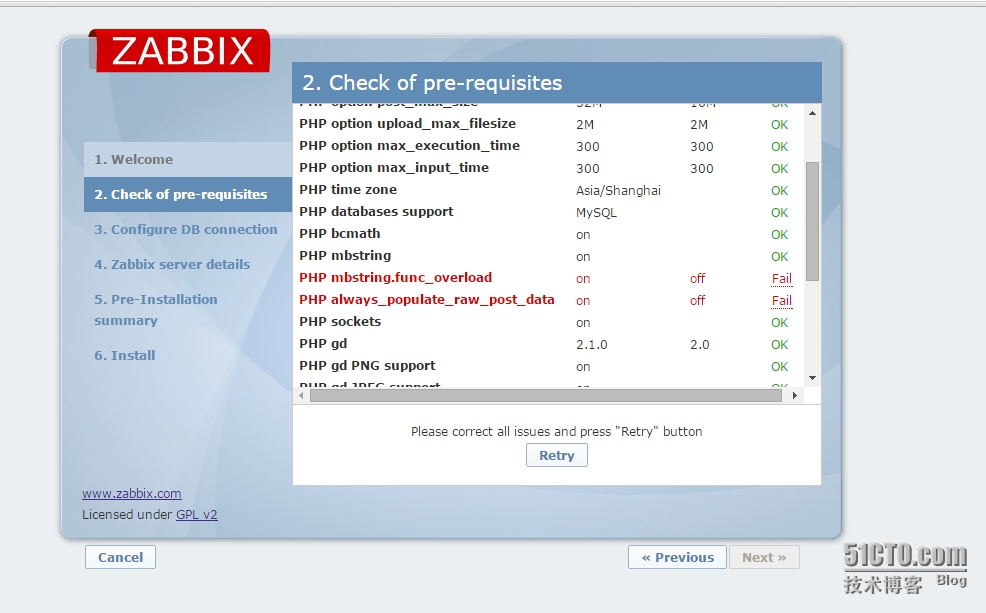
红色出现错误,一直困惑了我一天,换几个版本PHP编译也是一个样,后面查看官方文档,不明觉厉啊
官方手册说的很清楚
Pre-requisiteMinimum valueDescriptionPHP version5.3.0
PHP memory_limit option128MBIn php.ini:
memory_limit = 128M
PHP post_max_size option16MBIn php.ini:
post_max_size = 16M
PHP upload_max_filesize option2MBIn php.ini:
upload_max_filesize = 2M
PHP max_execution_time option300 secondsIn php.ini:
max_execution_time = 300
PHP max_input_time option300 secondsIn php.ini:
max_input_time = 300
PHP session.auto_start optionmust be disabledIn php.ini:
session.auto_start = 0.
Database supportOne of: IBM DB2, MySQL, Oracle, PostgreSQL, SQLiteOne of the following modules must be installed:
ibm_db2, mysql, oci8, pgsql, sqlite3
bcmathphp-bcmath
mbstringphp-mbstring
PHP mbstring.func_overload optionmust be disabledIn php.ini:
mbstring.func_overload = 0.
PHP always_populate_raw_post_data optionmust be set to -1Required only for PHP versions 5.6.0 or newer.
In php.ini:
always_populate_raw_post_data = -1
socketsphp-net-socket. Required for user script support.
gd2.0 or higherphp-gd. PHP GD extension must support PNG p_w_picpaths (--with-png-dir), JPEG (--with-jpeg-dir) p_w_picpaths and FreeType 2 (--with-freetype-dir).
libxml2.6.15php-xml or php5-dom
xmlwriterphp-xmlwriter
xmlreaderphp-xmlreader
ctypephp-ctype
sessionphp-session
gettextphp-gettext
Since Zabbix 2.2.1, the PHP gettext extension is not a mandatory requirement for installing Zabbix. If gettext is not installed, the frontend will work as usual, however, the translations will not be available.
然后按官方手册,mbstring.func_overload 必须关闭,lways_populate_raw_post_data option必须设为1,检测就通过了
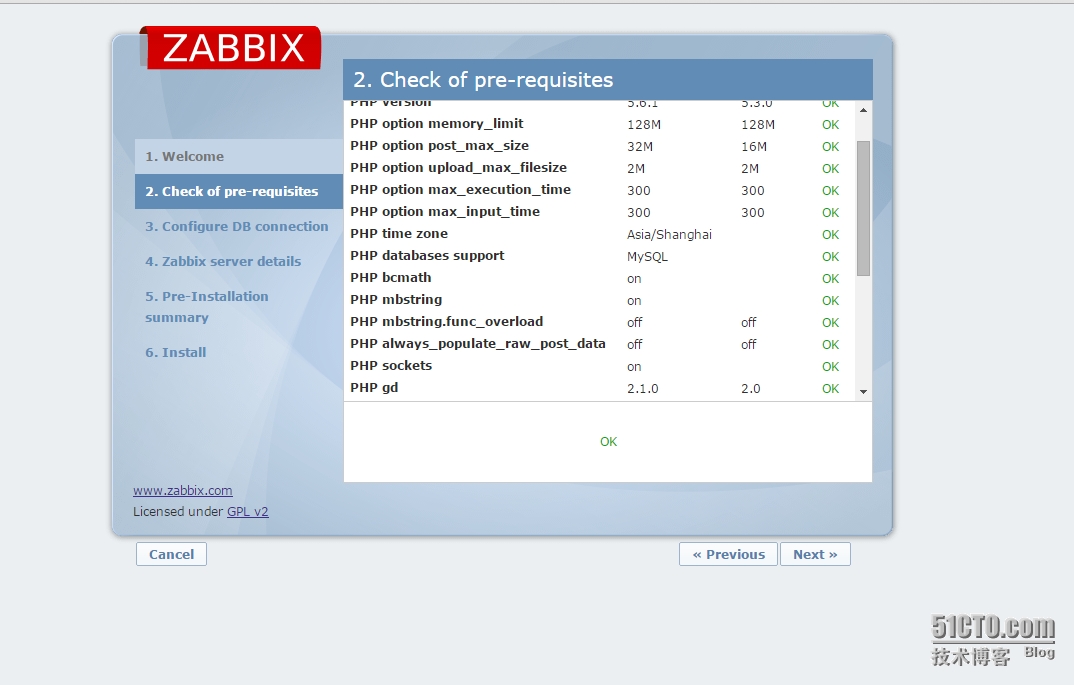
养成看官文文档习惯!
六、连接数据库问题
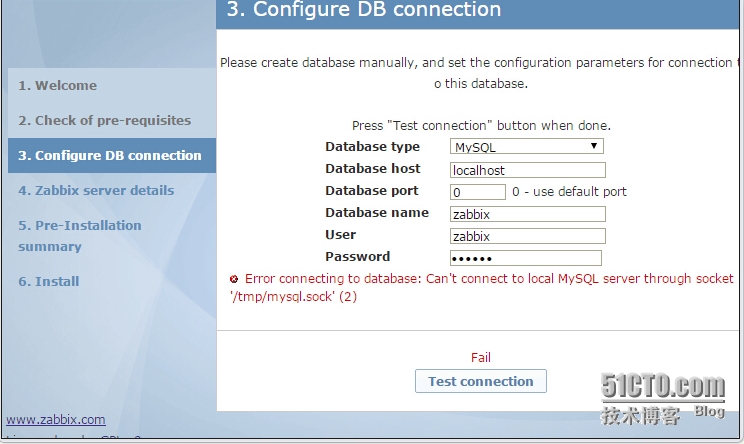
1、检查了配置文件zabbix_server.conf[root@dc2 zabbix]# cat /etc/zabbix/zabbix_server.conf
DBSocket=/data0/mysql/data3308/mysql.sock
my.cnf的配置文件[root@dcserver2 zabbix]# cat /etc/my.cnf
[mysqld3308]
basedir = /usr/local/mysql/
datadir = /data0/mysql/data3308
socket = /data0/mysql/data3308/mysql.sock //socket指定是一样
pid-file = /data0/mysql/data3308/mysqld.pid
user = mysql
port = 3308
skip_external_locking
back_log = 384
key_buffer_size = 256M
max_allowed_packet = 4M
thread_stack = 256K
table_open_cache = 128K
sort_buffer_size = 6M
read_buffer_size = 4M
join_buffer_size = 8M
myisam_sort_buffer_size = 64M
thread_cache_size = 64
query_cache_size = 64M
tmp_table_size = 256M
max_connections = 768
max_connect_errors = 10000000
#wait_timeout = 10
thread_concurrency = 8
explicit_defaults_for_timestamp = TRUE
event_scheduler=on
2、但还是显示默认只连接socket=/tmp/mysql.sock路径下,百思不理其解,因为mysql多事例的,所以[root@dc2 zabbix]# ln -sf /data0/mysql/data3308/mysql.sock /tmp/mysql.sock
既然解决test 通过了,治标不治本。虽然可以通过,但问什么在zabbix_server.conf没有生效这个指socket路径文件呢
七、最后一步手动创建配置文件
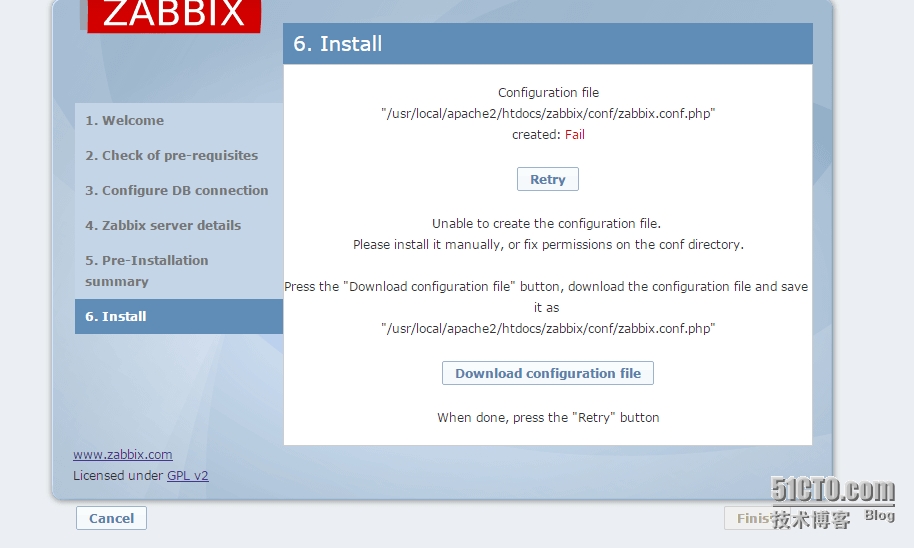
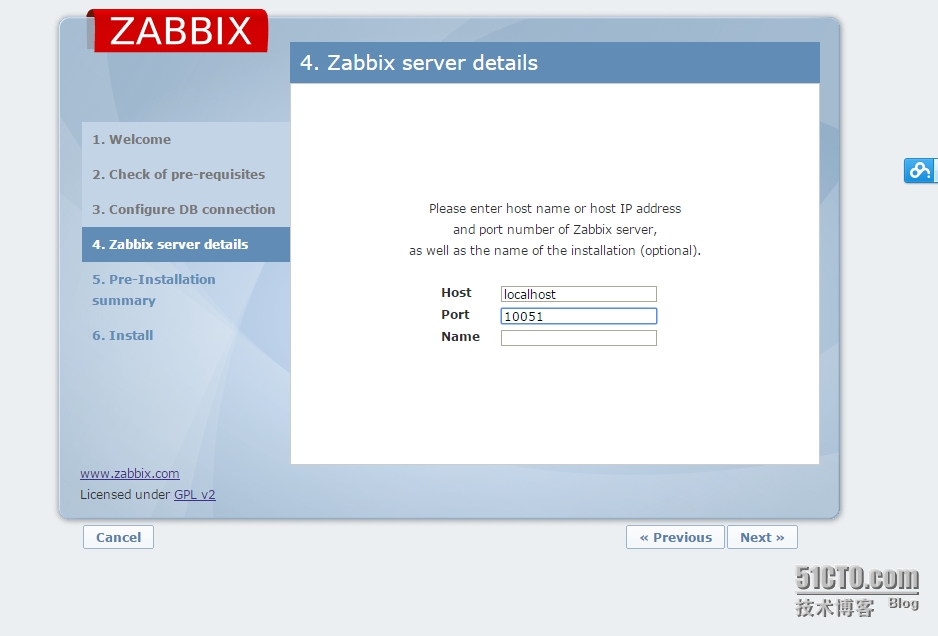
1、在这里还纠结个把小时,点击Download下载,按它提示,复制到指定目录下,并设好属主组apache,结果点击重试,还是不行。琢磨着[root@dcserver2 conf]# ll
总用量 12
-rw-r--r--. 1 apache apache 1036 6月 26 19:27 maintenance.inc.php
-rw-r--r--. 1 apache apache 429 6月 26 19:27 zabbix.conf.php.example[root@dcserver2 conf]# pwd
/usr/local/apache2/htdocs/zabbix/php/conf
2、打开它样列文件[root@dcserver2 conf]# vim zabbix.conf.php.example
// Zabbix GUI configuration file.
global $DB;
$DB["TYPE"] = 'MYSQL';
$DB["SERVER"] = 'localhost';
$DB["PORT"] = '0';
$DB["DATABASE"] = 'zabbix';
$DB["USER"] = 'zabbix';
$DB["PASSWORD"] = 'zabbix_password';
// Schema name. Used for IBM DB2 and PostgreSQL.
$DB["SCHEMA"] = '';
$ZBX_SERVER = 'localhost';
$ZBX_SERVER_PORT = '10051';
$ZBX_SERVER_NAME = '';
$IMAGE_FORMAT_DEFAULT = IMAGE_FORMAT_PNG;
?>
3、看来按着上面提示下载文件,是错的。按着这个样例文件,填写上去[root@dcserver2 conf]# cp zabbix.conf.php.example zabbix.conf.php;vim zabbix.conf.php
// Zabbix GUI configuration file.
global $DB;
$DB["TYPE"] = 'MYSQL';
$DB["SERVER"] = 'localhost';
$DB["PORT"] = '3308';
$DB["DATABASE"] = 'zabbix';
$DB["USER"] = 'zabbix';
$DB["PASSWORD"] = '11111';
// Schema name. Used for IBM DB2 and PostgreSQL.
$DB["SCHEMA"] = '';
$ZBX_SERVER = 'localhost';
$ZBX_SERVER_PORT = '10051';
$ZBX_SERVER_NAME = 'zabbix-server';
$IMAGE_FORMAT_DEFAULT = IMAGE_FORMAT_PNG;
?>
4、保存后,再点重试,OK,算是始始化完成了
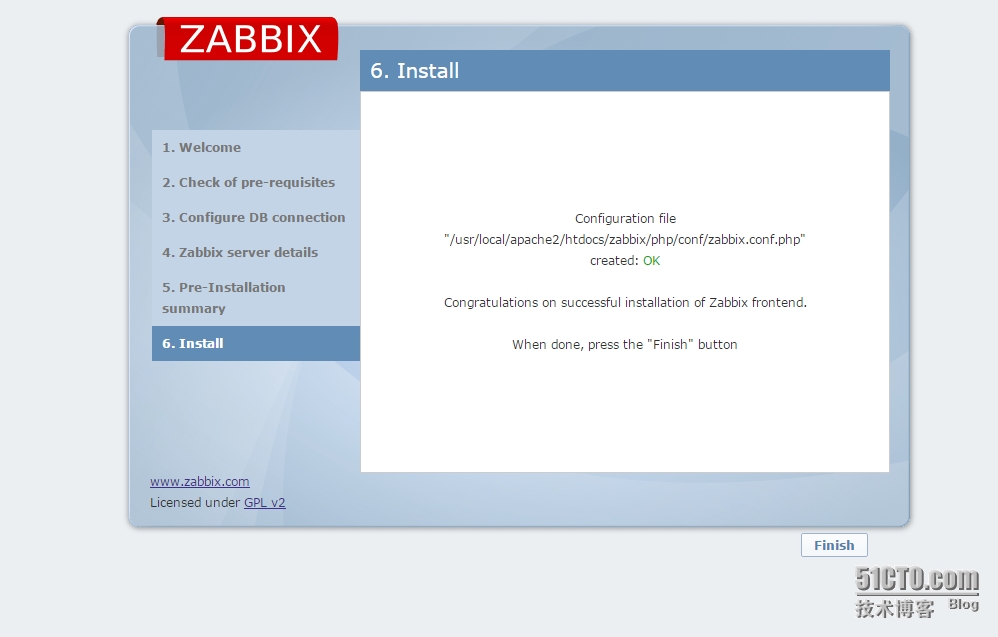
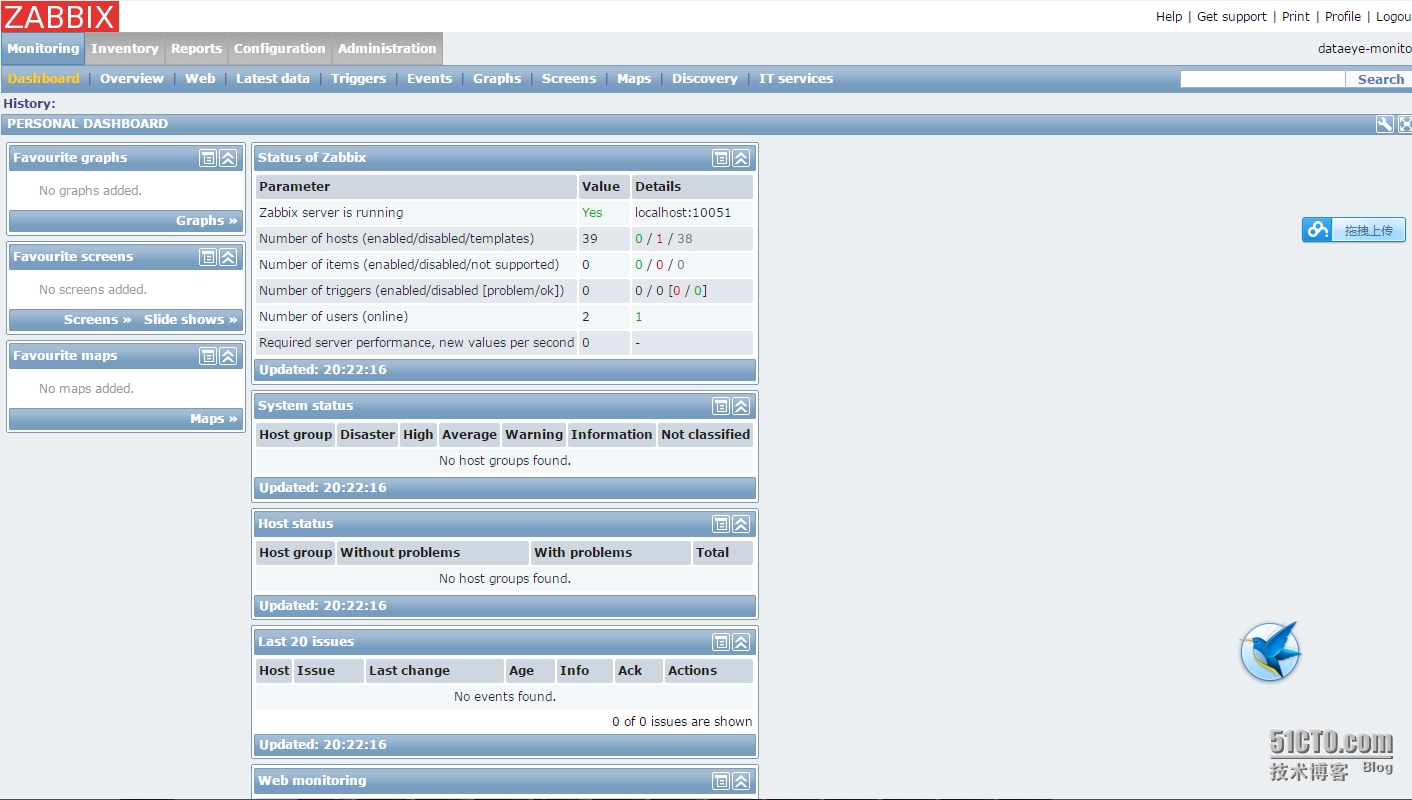

分享最新的 NVIDIA AI Software 资源以及活动/会议信息,精选收录AI相关技术内容,欢迎大家加入社区并参与讨论。
更多推荐


 0
0 0
0- 0


 已为社区贡献1条内容

所有评论(0)